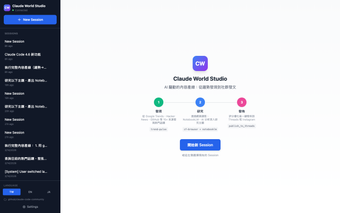
Server for MCP-based, context-aware text localization workflows
claude-world-studio, created by Claude World, is an MCP server that automates text localization and internationalization for development pipelines. The tool generates context-aware translations, preserves semantic nuance, and offers batch processing, structured-file handling, and live previews inside an MCP chat interface. It supports common localization formats and connects with MCP-compatible hosts, making it suitable for software developers, localization managers, and content creators seeking tighter editor-to-AI integration.
What tasks can you actually use it for?
The tool serves as a local MCP server that automates translation and adaptation of interface strings, documentation, and other text assets. It performs batch processing of localization strings, handles structured formats, and exposes a real-time preview and adjustment workflow inside the AI chat interface. Use cases include exporting translated JSON or ARB files, iterating phrasing with the model, and reducing manual copy-paste between editors and translation utilities.
How reliable are the localized outputs for production use?
Studio is designed to preserve brand voice and technical terminology, an explicit capability in its feature set, and is optimized for the Claude ecosystem. It supports dozens of major world languages according to its notes. Accuracy therefore depends on the underlying language model's multilingual performance; teams should plan editorial review for high-stakes strings and validate terminology against existing style guides.
What do I need to run it and integrate it into a workflow?
Operation requires an MCP-compatible host such as Claude Desktop or other MCP clients and a runtime that supports Node.js or Python, per the repository notes. The server connects via a host configuration file and is built to work with IDEs and local file stores. Its open-source codebase allows customization to match project-specific i18n pipelines and CI workflows.
Does it fit privacy-conscious or local-first setups?
Because it uses the Model Context Protocol to interact with local data, the server enables direct access to localization files from the model-hosting environment. That architecture lets teams keep copies in local repositories while the model accesses context, and the tool's integration model means available deployment and retention behaviors depend on the chosen MCP host and its access controls.
A practical choice for teams standardizing AI-assisted localization
The tool is a pragmatic option for localization teams embedded in the MCP ecosystem and for developers who want programmatic, model-driven editing of localized copy. Adoption in the MCP developer community indicates practical value, but usefulness depends on the language model’s translation fidelity, so plan for human review of sensitive content. Treat the tool as an integration layer rather than a final arbiter of published text.
Pros
Direct MCP access to local localization files, reducing manual copy-paste steps
Supports JSON and ARB formats common in web and mobile i18n
Real-time preview and in-chat adjustment of localized text
Laws concerning the use of this software vary from country to country. We do not encourage or condone the use of this program if it is in violation of these laws. Softonic may receive a referral fee if you click or buy any of the products featured here.